
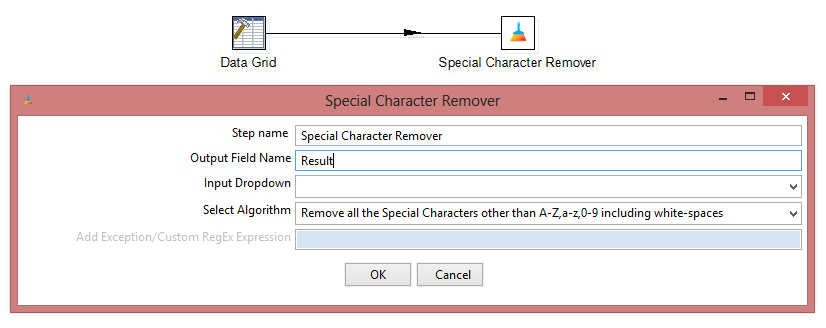
This is a blog on an upgraded version of the Special Character Remover Pentaho Kettle Plugin. Please read the Version 1.0.0 of this plugin before continuing with this.
- What is New?
- What are the sets of algorithms and their features?
- How does the “Add Exception/Custom RegEx Expression” label works?
- Codebase and Download
- How to Install the plugin (Pentaho 8 or higher)?
- How to build your own Pentaho plugin
What is New?
With the new version of the Special Character Remover plugin, i have introduced a feature to either choose or customize the algorithms to clean up the input data.
Users will now have the freedom to select any of predefined algorithms and to clean their data. An user can also write their own regular expressions in case any of the predefined algorithms doesn’t fit the requirement.

Unlike the previous version, Here you have two extra rows of choices:
- Select Algorithm: Allows you to choose between predefined sets of algorithms.
- Add Exception/Custom RegEx Expression: This part is usually disabled except when you choose “Keep A-Z,a-z,0-9 and ADD Exceptions” and “Custom Regular Expression” options from the above predefined list.
What are the sets of algorithms and their features?
The list of algorithms are pretty self explanatory. But for the sake of convenience, the algorithms are listed below:

How does the “Add Exception/Custom RegEx Expression” label works?
When you select the last two algorithms from the “Select Algorithm” portion, the “Add Exception/Custom RegEx Expression” text box gets enabled. Check the image below:

You will find an text written like “[enter your code here]“. You need to do all sorts of exception addition inside the brackets else you will given a red warning.

Subscribe to continue reading
Subscribe to get access to the rest of this post and other subscriber-only content.
 Tech Spaghetti
5 responses to “Special Character Remover | version 1.1.0 | Pentaho Kettle Step Plugin”