
Today I will try to explain how to create REST-API in Mark Logic database. Creating a REST Api will allow the client applications like Pentaho, Tableau, etc to easily connect to the database.
Before progressing on the steps, you should have the following installed on your system:
- Mark Logic database (latest version is available here)
- CURL for REST API calls (download curl)
- A document database running on the Mark Logic server. I will assume you created a database named: ML_REST_TEST_DB
- Cygwin (Only if you are using a Windows systems) (download here)
- Vim, emac, notepad++ or any text editor
Assumptions
- MarkLogic database user name = admin
- MarkLogic database user password = password
- MarkLogic database IP address = localhost (127.0.0.1)
Follow the below steps to create a REST API in Mark Logic database:
Create XML file using text editor
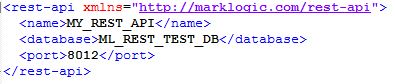
Save the file as : my_rest_api.xml
Tags:
name: Generic name of my rest api
database: the database name i want the rest api to be created on
port: the port number i will be using to make rest-api calls. Note this port number should not be used by any other application.
Create REST API endpoint of your database
Now open cygwin or terminal in your system and enter the below command**:

Subscribe to continue reading
Subscribe to get access to the rest of this post and other subscriber-only content.
 Tech Spaghetti
2 responses to “Creating REST-API in Mark Logic database”