P.S.: Pentaho has a released GenAI Plugin Suite available in the Marketplace. It has got a low-code/no-code capability to interact with LLM models. Check it out and request the plugin from the Pentaho Sales Team.
- 🎪 Introduction
- 🌲Assistants Framework
- ⚽ Additional Playground
- 🎲 Recommended Reads and References
- 🔓Sample Codebase Repository
Disclaimer: This is not a Hitachi Vantara or OpenAI sponsored content.
🎪 Introduction
Large Language Models have been the talk of every tech discussion and meeting in the past 1 year. OpenAI with its AI Chatbot, ChatGPT (version 3.5) has taken the world perception by storm. It is no wonder every person in the world has felt the impact that a generative AI can bring to their work and productivity. OpenAI is one such company at the forefront of all of this innovation. Working with Generative AI (or any ML/AI model) requires clean, consistent and quality data. Without the proper data, AI models will not generate the result you expect and may behave differently. The role of data pipeline and ETL tools like Pentaho play a very important role in ensuring the data is properly cleaned and transformed before the AI models can use them.
However, OpenAI GPT models are closed models and are propriety products of OpenAI. For third-party applications like Pentaho to interact with the AI models, it needs to make use of the available endpoints and client libraries. In this blog post, let us decode how Pentaho can make use of the available OpenAI APIs to interact with and generate responses.
Brief about OpenAI APIs

OpenAI released its API platform and client libraries in HTTPs, python and Node.js to enable third-party applications to leverage the power of generative AI. The platform provides a bunch of AI capabilities like Text generation, Prompt engineering, embedding, Speech to text, Image generation, Fine-tuning, Assistants, etc. These capabilities, powered by supported clients, enable the end users to bring the power of generative AI to their applications.
One of the powerful and exciting features of the OpenAI platform is the Assistants. Assistants API(s) enable the end users and non-AI users to build their own personal generative AI assistant. Users can bring their data and codes, and integrate with the OpenAI GPT framework to generate user-specific results.
Brief about Pentaho Transformations

Pentaho Data Integration or PDI is a data product for building a data pipeline owned by Hitachi Vantara. PDI have a high level of two building blocks: Transformations (KTR) and Jobs (KJB). Pentaho Transformations enable data ingestion, cleaning, manipulation and loading, while Jobs orchestrate multiple transformations. PDI connects to various data sources including REST API Clients. With logging and monitoring, it’s a robust solution for managing and transforming data in business intelligence.
With the availability of OpenAI’s HTTP(s) client and Pentaho’s ability to connect to various data systems and APIs, building a framework for the OpenAI Assistants is possible and we will explain in the later sections of this blog.
🌲Assistants Framework
Assistants Introduction
The Assistants API allows you to build AI assistants within your own applications. An Assistant has instructions and can leverage models, tools, and knowledge to respond to user queries.
Source: OpenAI

The Assistants API currently supports three types of tools:
- Code Interpreter: The Code Interpreter accepts queries and datasets to interpret the user prompts to generate the response. Internally it reads the prompts and generates a Python code in a sandboxed environment to generate the output. In the blog, we will go through an example of using the code interpreter using Pentaho DI.
- Retrieval: Also called Knowledge Retrieval, allows you to upload your propriety / private documents and make use of the chatGPT model to read and generate output.
- Function Calling: Similar to the Chat Completions API, the Assistants API supports function calling. Function calling allows you to describe functions to the Assistants and have them intelligently return the functions that need to be called along with their arguments.
A list of supported files that an Assistant Framework supports are listed here.
Using the OpenAI Assistant API we can easily integrate with Pentaho to leverage the capabilities of large language models. This blog will explain in detail a sample high-level architecture, pre-requisites and the Pentaho & OpenAI framework created for this purpose.
High Level Architecture with OpenAI and Pentaho

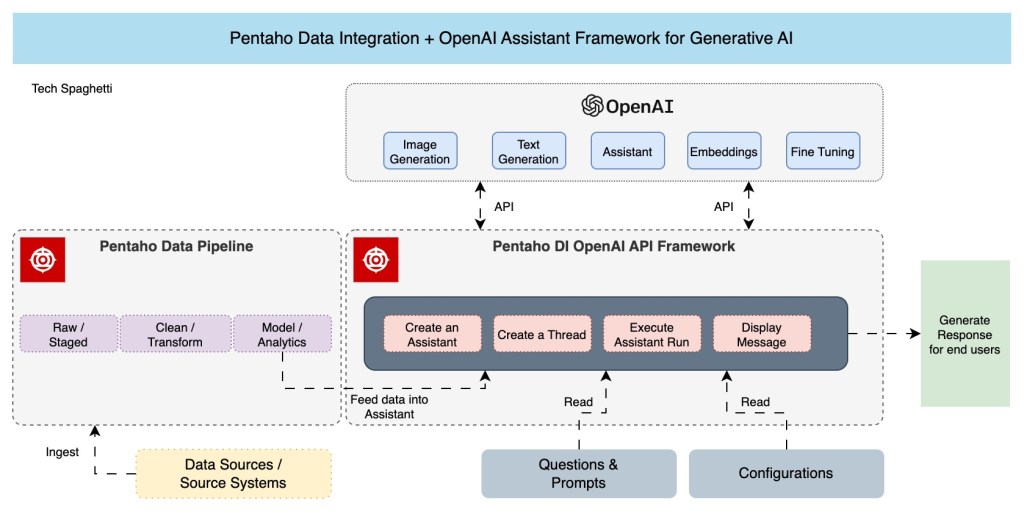
Pentaho Data Integration enables the end users to seamlessly communicate with the OpenAI Assistant framework using the REST API’s. The above architecture primarily comprises three high-level components: OpenAI Component; Pentaho Data Pipeline and Pentaho DI OpenAI API Framework.

Subscribe to continue reading
Subscribe to get access to the rest of this post and other subscriber-only content.
 Tech Spaghetti