

[Update 2023]: This post is now updated with the latest information regarding the change in the Maven project. Please follow that highlighted section in Step-1 to make necessary changes to the project.
- Step-1: Open Eclipse and create a Maven Project
- Step-2: Create a sample Transformation/Job
- Step-3: Java Code that will Trigger the Kettle
- Codebase
If you want to execute any transformation file using Java language, follow the below steps.
Step-1: Open Eclipse and create a Maven Project
The code uses maven to build the project. The maven dependencies varies based on the kettle steps involved. If the kettle transformation involves database connectivity, then the you will need to add the corresponding database jar files. The pom.xml for developing the project is as below:
<!-- Applicable only for Pentaho version 7 or lower -->
<dependencies>
	<!-- Pentaho Kettle Core dependencies development -->
	<dependency>
		<groupId>pentaho-kettle</groupId>
		<artifactId>kettle-core</artifactId>
		<version>5.0.0.1</version>
	</dependency>
	<dependency>
		<groupId>pentaho-kettle</groupId>
		<artifactId>kettle-dbdialog</artifactId>
		<version>5.0.0.1</version>
	</dependency>
	<dependency>
		<groupId>pentaho-kettle</groupId>
		<artifactId>kettle-engine</artifactId>
		<version>5.0.0.1</version>
	</dependency>
	<dependency>
		<groupId>pentaho-kettle</groupId>
		<artifactId>kettle-ui-swt</artifactId>
		<version>5.0.0.1</version>
	</dependency>
	<dependency>
		<groupId>pentaho-kettle</groupId>
		<artifactId>kettle5-log4j-plugin</artifactId>
		<version>5.0.0.1</version>
	</dependency>
	<!-- The database dependency files. Use it if your kettle file involves database connectivity. -->
	<dependency>
		<groupId>postgresql</groupId>
		<artifactId>postgresql</artifactId>
		<version>9.1-902.jdbc4</version>
	</dependency>
</dependencies>
Note: in case your kettle involves database connectivity, then you will need to add the corresponding dependency. As per the code above, i have used PostgreSQL as the database connectivity in my transformation.
For using the Pentaho version 8.x.x or higher, there is a change in the POM design and dependencies. Please follow this blog which describes in details the use of pentaho di plugins for Pentaho version 8 or higher.
Step-2: Create a sample Transformation/Job
Create a sample transformation or Job. Check the image below. I have used a simple “Data Grid” step and a “Text File Output” Step for demo purpose.
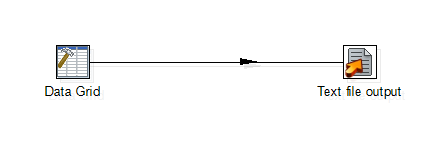
We will call this “ktr” from Java.
A sample Job would be simply calling a transformation from a job.

Step-3: Java Code that will Trigger the Kettle
Write the below code in your Main class:
For Executing a Pentaho Transformation
try {
/**Initialize the Kettle Enviornment*/
KettleEnvironment.init();

/**
* Create a trans object to properly assign the ktr metadata.
* @filedb: The ktr file path to be executed.
*/
TransMeta metadata = new TransMeta(filedb);
Trans trans = new Trans(metadata);

// Execute the transformation
trans.execute(null);
trans.waitUntilFinished();

// checking for errors
if (trans.getErrors() > 0) {
   System.out.println("Error Executing Transformation");
}
} catch (KettleException e) {
   e.printStackTrace();
}
For Executing a Pentaho Jobs

Subscribe to continue reading
Subscribe to get access to the rest of this post and other subscriber-only content.
 Tech Spaghetti
19 responses to “Java and Pentaho Kettle | Executing a Kettle File using Java”